Watch video






 Sign in with Google
TubeBuddy Software Comparisons
TubeBuddy vs VidIQ: Which YouTube tool is best in 2026?


TL;DR:
- TubeBuddy Legend (~$27/month, annual) costs significantly less than VidIQ’s Max plan ($39/month, annual) — and includes features VidIQ doesn’t have.
- TubeBuddy offers a clear advantage with A/B testing that allows title, thumbnail, description, and tag testing against CTR, watch time, and other factors. VidIQ has no equivalent.
- TubeBuddy’s Legend plan includes bulk processing tools like Bulk Find/Replace, Bulk Thumbnail Overlays, Scheduled Publish, and more that VidIQ doesn’t offer.
- VidIQ has the edge in AI content ideation (Daily Ideas) and paid creator coaching.
- For most independent creators, TubeBuddy delivers more for less: lower price, more optimization tools, and the only A/B testing feature in this category.
Picking a YouTube growth tool shouldn’t feel like a homework assignment, but here we are. Both TubeBuddy and VidIQ have real users, real reviews, and real reasons to buy.
We’d argue TubeBuddy has many more reasons to buy. We’re obviously biased. But you know who isn’t biased? You!
You’re the one looking to grow a YouTube channel, you’re the one who decides where your hard-earned money is spent, you’re the one that ultimately needs to compare TubeBuddy and VidIQ to make the choice. So look at the features, look at the prices, and make the call. We’ll give you everything you need to make the right choice for you and your YouTube journey.
Before we get into it, let us just say this: we like VidIQ. They’re “the competition” in the same way other creators in your niche are “the competition.” Competition pushes people to build and to be better, and that dynamic benefits every creator in this ecosystem.

What’s the big idea?!
Get video inspo backed by data. Next Video Ideas analyzes your channel, audience, niche, and millions of YouTube datapoints to make your next video a #1.
Table of contents
- TL;DR:
- The quick verdict
- What do TubeBuddy and VidIQ actually do?
- Keyword research: who surfaces better opportunities?
- A/B testing YouTube content
- Bulk processing and workflow: who saves more time?
- AI features and content ideation
- Winner: VidIQ wins on in-tool AI features as TubeBuddy advocates a different approach to AI in creator workflows.
- Pricing comparison: Spoiler: TubeBuddy costs less and does more
- Who should choose TubeBuddy?
- Who should choose VidIQ?
- FAQ – TubeBuddy vs VidIQ: Which YouTube tool is best in 2026?
- Conclusion
The quick verdict
TubeBuddy wins on price, A/B testing, bulk workflow tools, and, being YouTube Certified, for its ability to integrate directly into YouTube and YouTube Studio. TubeBuddy has over 50 tools for creators in its suite. VidIQ wins on AI content ideation and structured creator coaching. For most independent creators who want to optimize their content and access a wealth of data to help guide their decisions, TubeBuddy’s value per dollar is the stronger case, especially at the advanced tier.
| Feature | TubeBuddy | VidIQ |
|---|---|---|
| Keyword research | ✓ | ✓ |
| A/B testing | ✓ (Legend) | ✗ |
| Bulk processing | ✓ (Legend) | ✗ |
| AI content ideation | ✓ | ✓✓ |
| AI thumbnail tools | Limited | ✓ |
| Coaching / Masterclasses | ✗ | ✓ (paid tiers) |
| Works inside YouTube | ✓ | Partial |
| Entry paid plan (annual) | Pro — ~$12/mo | Boost — ~$16.58/mo |
| Advanced plan (annual) | Legend — ~$27/mo | Max — $39/mo |
Read more on the top YouTube analytics tools.
What do TubeBuddy and VidIQ actually do?
At their core, both TubeBuddy and VidIQ are YouTube growth tools, but each approaches growth differently. TubeBuddy is built as an optimization engine: it helps you make the most of the content you’re creating. VidIQ leans more toward ideation, helping you figure out what to make in the first place.
TubeBuddy in brief
TubeBuddy is a browser extension that lives inside the YouTube and YouTube Studio interface. Integration means your keyword research, SEO scorecard, A/B testing, and bulk tools are all right there while you’re working in YouTube Studio, not in a separate tab you have to context-switch to. TubeBuddy is YouTube-certified and has been doing this for more than a decade.
TubeBuddy’s depth of features is a clear benefit, but that can also be a challenge for creators hoping for a one-click solution. Keyword Explorer, A/B testing, bulk processing, SEO scorecards, tag suggestions, competitor research, upload templates, and much more have been built with creators in mind, but it’s a lot. Also, TubeBuddy’s integration with YouTube and YouTube Studio mean the UI can look a bit old-school in places. TubeBuddy’s focus is on building tools that work and presenting and providing context on the YouTube data that actually matters.
VidIQ in brief
VidIQ operates primarily as a web dashboard with an extension component. Its strongest features center on telling you what to make: Daily Ideas generates personalized content topic suggestions, AI tools to help you concept thumbnails, and coaching tiers offer structured education from experienced creators. The keyword data is solid, competitor analytics are useful, and the overall product feels modern and well-designed.
The core difference: TubeBuddy helps you optimize what you’re making. VidIQ helps you decide what to make.
Keyword research: who surfaces better opportunities?
Both tools have solid keyword research capabilities. The real difference isn’t in data quality — it’s in where that data lives and how naturally it fits into your actual upload workflow. That’s a workflow question as much as a features question.
Read more about the ins and outs of YouTube keyword research in our guide.
TubeBuddy’s Keyword Explorer shows volume scores, competition levels, and related terms. Because it’s built directly into YouTube’s interface, it offers that data in context. When you search a term on YouTube, you see the data right there on the results page. When you’re writing a title or description for a new upload, the keyword data is embedded in your workflow, not in another window. This integration eliminates tab- and context-switching that can break your focus.
VidIQ’s keyword tools are strong in a different direction. Their data is particularly well-suited for trend-based discovery — surfacing content concepts that are gaining momentum so you can get in before they peak. Its competitor keyword overlay lets you see what terms similar channels are targeting, which can help creators ride trends or reverse-engineer a competitor’s approach.
For optimization-focused creators who want to research and act in the same context, TubeBuddy’s in-YouTube integration is the practical advantage. For trend-based creators looking to catch waves, VidIQ’s dashboard has the edge.
Winner: Tie — slight TubeBuddy edge for creators who live inside YouTube’s interface; slight VidIQ edge for trend-based keyword discovery.
Read our guide to YouTube keyword research in TubeBuddy’s YouTube Keyword Explorer.
A/B testing YouTube content
YouTube A/B testing is a major differentiator when comparing TubeBuddy and VidIQ.
In short, VidIQ doesn’t have A/B testing. If you’re serious about improving your click-through rate with actual data rather than guesswork, this section is likely where your decision gets made.
While YouTube’s own test and compare thumbnails feature may narrow the gap for some users, this native feature in YouTube studio doesn’t offer anywhere near the testing granularity of TubeBuddy A/B testing tools.
With TubeBuddy’s YouTube A/B testing tools, you create two versions of a title, thumbnail, description, or tag set. TubeBuddy runs them on your live video, showing each version to different viewers. It tracks which variant drives the behavior you’re looking for. It won’t call a winner until 95% statistical confidence is reached.
YouTube’s native thumbnail testing only allows testing for watch time. With TubeBuddy A/B testing tools, creators can choose what outcome they’re solving for. For example, click-through rate (CTR). CTR is a critical signal for YouTube’s algorithm. A video that earns more clicks on its thumbnail and title gets pushed into more feeds, which leads to more watch time, which leads to more recommendations. Even a 1–2% improvement in CTR compounds across every video on your channel. And assuming you’re making quality videos, watch time naturally follows.
Even using YouTube’s native test and compare features, VidIQ users are making optimization calls without real data. They’re guessing which thumbnail is better and intuiting which title is more clickable.
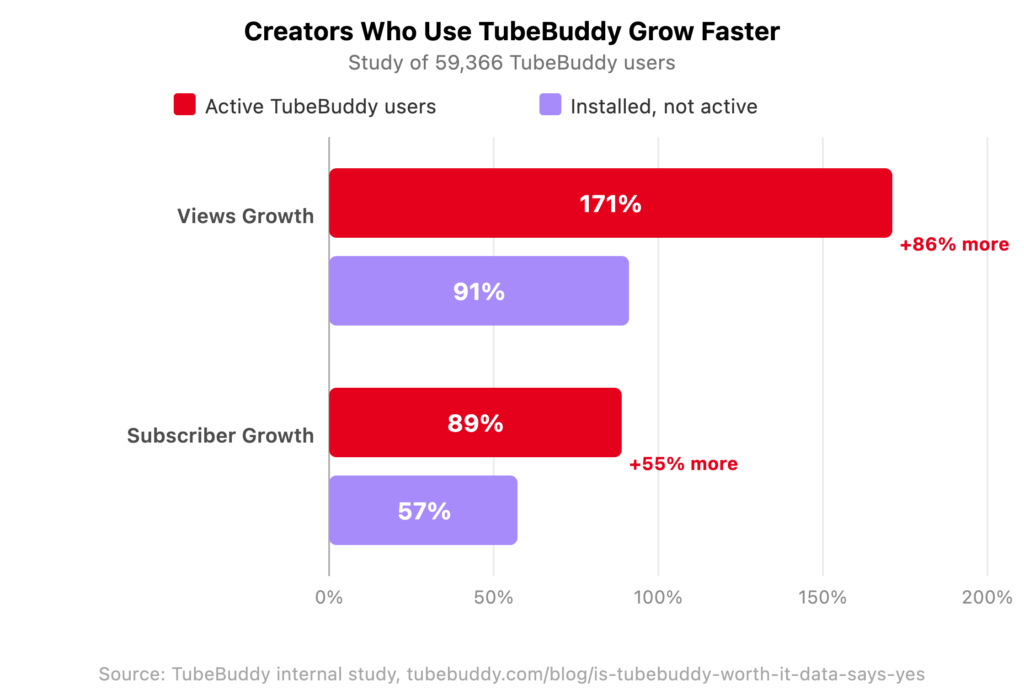
The broader data backs this up: in a study of 59,366 creators, active TubeBuddy users saw 86% more views and 55% more subscriber growth than creators who installed TubeBuddy but didn’t actively use TubeBuddy’s tools. In other words, TubeBuddy works.
Read more about split testing content with TubeBuddy A/B Testing for YouTube.
Why thumbnail A/B testing matters more than most creators realize
Your thumbnail is the first (often the only) thing a viewer sees before deciding to click. The algorithm doesn’t know if your video is good until people watch it. The thumbnail’s job is to get people there. It’s the variable you control most directly, and it’s the one most creators optimize by feel rather than by data.
TubeBuddy gives you a controlled experiment: same video, same audience, two thumbnails, real results. The one that drives the most clicks is the winner. No guess work. When you know which thumbnail wins and by how much, you start building pattern recognition about what works for your specific audience. Not just generic best practices that may or may not apply to your niche.
Winner: TubeBuddy, decisively. VidIQ cannot compete here and isn’t trying to.
What’s the big idea?!
Get video inspo backed by data. Next Video Ideas analyzes your channel, audience, niche, and millions of YouTube datapoints to make your next video a #1.
Bulk processing and workflow: who saves more time?
Once you have any volume of videos on your channel, you need tools that make editing things like descriptions, end screens, and even titles easy. Update an affiliate link, change a call-to-action in every description, add an end screen to an old video catalog. Doing this manually means hours of repetitive work. The TubeBuddy bulk processing suite is designed specifically for this problem.
TubeBuddy’s Legend plan includes the following bulk tools:
- Bulk Find/Replace — update a specific word, URL, or phrase across every description in your catalog simultaneously. Change one affiliate link across 200 videos in a single action instead of 200 separate edits.
- Bulk Thumbnail Overlays — apply a branded overlay or update an image element across multiple thumbnails at once.
- Bulk Delete Comments — manage comment sections at scale without clicking through individual videos.
- Scheduled Publish — queue videos to publish at a specific time without staying at your desk.
The real-world use case for Bulk Find/Replace alone justifies the Legend plan for any established creator. Affiliate program links can change (just as any Amazon affiliate marketer). Sponsors rebrand. Your intro or outro script evolves. The links you want to include across descriptions change. Without bulk tools, every one of those changes means opening every video manually and editing one by one. With TubeBuddy, it’s a few clicks.
VidIQ’s workflow tools are built around individual video optimization, not catalog management. If your channel is young and you have fewer than 30 videos, this won’t matter much. But if older videos are driving meaningful search traffic for you — and they should be — the ability to update that catalog efficiently is a real operational advantage.
Upload templates: time savings before you even publish
Before a video even goes live, TubeBuddy’s upload templates let you pre-fill your standard tags, description structure, cards, and end screen configurations. You open a new upload and your baseline metadata is already there. It’s not glamorous, but it saves 10–15 minutes per upload and eliminates the forgetting-to-add-tags problem that’s quietly hurt more channels than anyone wants to admit.
Learn more about bulk editing with TubeBuddy bulk tools.
Winner: TubeBuddy. VidIQ doesn’t have equivalent catalog management tools.
AI features and content ideation
TubeBuddy takes the view that anyone with access to Claude, ChatGPT, or other LLM can (and should) create customized workflows for their content vision.
VidIQ focuses much of its attention on AI features and it has some genuinely useful AI tools for creators. If AI-driven content strategy is your primary need, VidIQ is the more capable tool.
VidIQ’s AI strengths:
- Daily Ideas — personalized content topic suggestions based on your channel’s niche and current search trends. Updated daily, actually useful for creators who struggle with “what should I make next?”
- AI thumbnail maker — generate clickable thumbnail concepts directly from your video content. TubeBuddy’s thumbnail tools don’t do this.
- AI Coach — answers channel strategy questions at higher tiers. Useful for creators who want conversational guidance on growth decisions.
- Masterclasses — structured creator education available at premium tiers. Real instruction, not just a help doc.
TubeBuddy AI tools cover AI-assisted title generation, description writing, tag suggestions, and content ideation. They’re solid and genuinely useful, but they’re secondary to TubeBuddy’s core strength in optimization and testing.
If you’re already using Claude, ChatGPT, Gemini, or another AI tool — and most creators who are paying attention already are — VidIQ’s AI ideation features may be redundant. You can get equally good (and often better) video ideas, title variations, and content strategy from a free or existing AI subscription. VidIQ’s AI features are curated prompts you can easily replicate in your creator workflow.
When VidIQ’s AI features actually matter
VidIQ’s in-tool AI is most useful for:
- Newer creators who haven’t yet built an AI workflow and want ideation baked into their YouTube tool
- Creators who want a single dashboard for everything and genuinely dislike context-switching between tools
- Anyone who finds Daily Ideas useful for discovering content angles they wouldn’t have thought of independently
It’s less relevant for creators already using Claude, ChatGPT, or Gemini regularly — that group is getting equivalent or better ideation from tools they’re already paying for.
Winner: VidIQ wins on in-tool AI features as TubeBuddy advocates a different approach to AI in creator workflows.
Pricing comparison: Spoiler: TubeBuddy costs less and does more
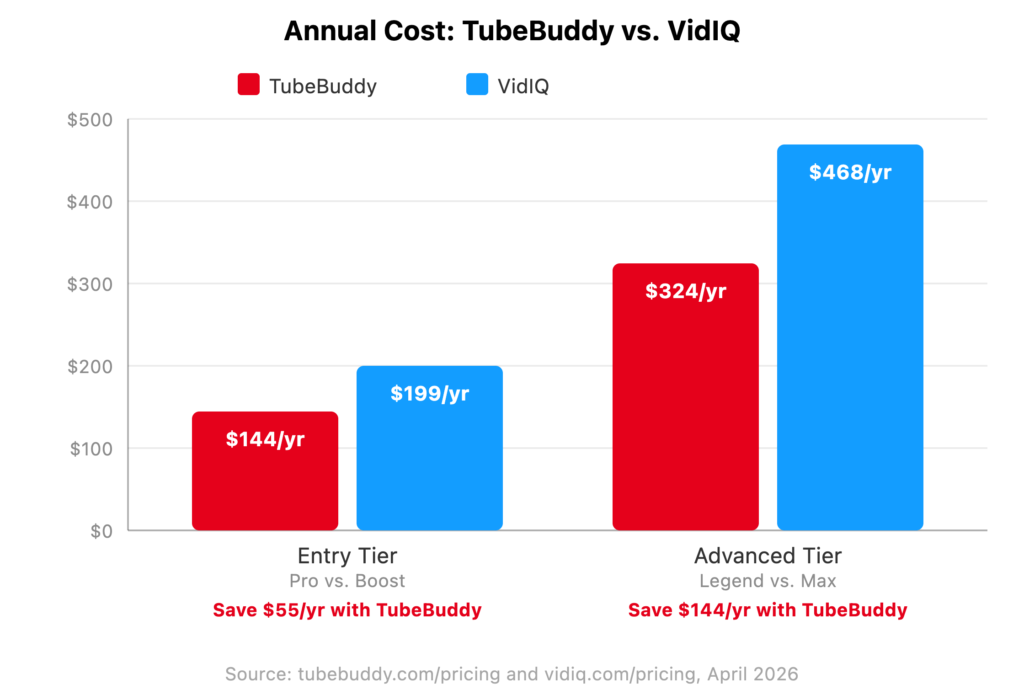
TubeBuddy’s Legend plan, at approximately $27/month on annual billing, costs about half of VidIQ’s Max plan at $39/month annually. That’s a $144/year difference. At the Legend (TubeBuddy) / Max (VidIQ) tier is where TubeBuddy’s major differentiators live: A/B testing, bulk processing, and full SEO access. Features VidIQ doesn’t offer at all..
| TubeBuddy | VidIQ | |
|---|---|---|
| Free plan | ✓ | ✓ |
| Entry paid plan (annual) | Pro — $12/mo ($144/yr) | Boost — $16.58/mo ($199/yr) |
| Advanced plan (annual) | Legend — $27/mo ($324/yr) | Max — $39/mo ($468/yr) |
| A/B testing | Legend plan only | Not available |
| Bulk processing tools | Legend plan | Not available |
| AI coaching / Masterclasses | Not available | Max plan |
The ROI framing matters here. At $39/month, VidIQ Max gives you more AI credits and structured coaching. At ~$27/month, TubeBuddy Legend gives you A/B testing and bulk catalog management. What’s worth more to you, as a creator, depends on what your channel actually needs. But if you want optimization tools with real data behind them, TubeBuddy is both cheaper and more capable.
Winner: TubeBuddy, for value at the advanced tier and as the only option with A/B testing at any price.
What’s the big idea?!
Get video inspo backed by data. Next Video Ideas analyzes your channel, audience, niche, and millions of YouTube datapoints to make your next video a #1.
Who should choose TubeBuddy?
TubeBuddy is the stronger choice if any of these describe you:
- You want to optimize your existing video library, not just plan new content. TubeBuddy’s bulk tools and A/B testing are built for this problem specifically.
- You have 20 or more videos and catalog management is starting to matter — updating descriptions, refreshing metadata, adding end screens at scale.
- Budget is a real consideration. TubeBuddy Pro at ~$12/month (annual) and Legend at ~$27/month give you more optimization capability per dollar than the equivalent VidIQ tier.
- You want to make thumbnail and title decisions with data. A/B testing is the only way to know what’s actually performing better, not what you think looks better.
- You prefer working inside YouTube’s interface. TubeBuddy’s extension is designed to keep your tools right where you’re already working, not in a separate dashboard.
- You want to reach international audiences. The Legend plan includes an auto-translator that localizes your titles and descriptions into other languages to improve discoverability globally.
Who should choose VidIQ?
VidIQ is worth choosing if these are your priorities:
- You’re in the early stages of building a content strategy and want AI-driven topic ideas surfaced daily, based on what’s actually trending in your niche. Daily Ideas is a genuinely useful feature for this stage.
- You want structured coaching as part of your subscription. VidIQ’s Masterclasses and AI Coach features are helpful if you want education and strategy guidance.
- A more modern dashboard experience matters to you. VidIQ’s web interface is polished and well-designed and wins on UI.
- You’re not yet using a general-purpose AI tool. If you don’t use Claude, ChatGPT, Gemini, etc. and you want ideation features baked into your YouTube workflow, VidIQ can help.
FAQ – TubeBuddy vs VidIQ: Which YouTube tool is best in 2026?
Yes — both are browser extensions and can run simultaneously. Some creators use both, though most settle on one for day-to-day workflow. If you want to test before committing, start with both free tiers and see which one you actually reach for.
Yes — and arguably more so than for larger channels. When you’re early, every view compounds differently. The keyword research and SEO scorecard on TubeBuddy Pro help you identify what people are actually searching for and optimize around it, rather than publishing and hoping the algorithm figures it out. Starting with good optimization habits at a small channel size tends to compound faster than retrofitting them later.
No. VidIQ does not offer A/B testing for thumbnails, titles, or descriptions. TubeBuddy is the only tool of the two with this feature, available on the Legend plan.
Both are solid. TubeBuddy’s Keyword Explorer is tightly integrated into YouTube’s interface, so you’re researching and optimizing without switching tabs. VidIQ’s keyword data has a slight edge for trend-based discovery. For most creators, either tool will surface actionable opportunities — the difference is in workflow, not data quality.
Depends on what you need. If you want help deciding what content to make, VidIQ’s Daily Ideas feature is genuinely useful for early-stage strategy. If you want to optimize the content you’re already making — and spend less money doing it — TubeBuddy is the stronger value. Most creators find they need optimization tools before they need ideation tools.
Conclusion
The comparison comes out like this: TubeBuddy wins on price, A/B testing, bulk workflow tools, and YouTube integration. VidIQ wins on in-tool AI ideation and structured creator coaching — though that win shrinks considerably if you’re already using an LLM like Claude or ChatGPT in your workflow.
For most independent creators who want to optimize what they’re making, spend less money doing it, and make thumbnail and title decisions based on actual data — TubeBuddy is the right call.