


 Watch video








 Sign in with Google
YouTube Strategy
Best time to post on YouTube: How to find your exact upload window

If you want more views, finding the best time to post on YouTube matters. But the usual advice floating around online is too generic to be useful. “Post at 3 p.m. on Thursday” might work for one niche, one audience, or one region, and fail completely for yours.
The real best time to post on YouTube is channel-specific. It depends on when your audience is active, when similar content performs well, and whether you have enough data to make confident decisions. The good news: you do not need to guess.
In this guide, we’ll cover two practical ways to find the best time to post on YouTube for your channel. The first uses YouTube Studio’s built-in audience data. The second is a smarter, more flexible “copycat” strategy that works even if you’re brand new and don’t yet have enough analytics of your own.
Table of Contents
- tl;dr – How to find the best time to post on YouTube
- Why generic posting advice usually fails
- Method 1: Use YouTube Studio’s audience heat map
- Method 2: Use the copycat strategy to find proven upload times
- Why the copycat strategy works so well
- This works for Shorts and long-form
- How to test the best time to post on YouTube without overthinking it
- A simple workflow you can repeat in 10 minutes
- Frequently asked questions
- Conclusion – Stop posting blind

Get an unfair advantage on YouTube
Give your YouTube channel the upper hand and easily optimize for more views, more subs, and more of every metric that matters.
tl;dr – How to find the best time to post on YouTube
- The best time to post on YouTube is not universal. Generic posting-time advice is often too broad to help a specific channel.
- YouTube Studio has a built-in heat map called When your viewers are on YouTube, found under Analytics → Audience.
- That heat map can be useful, but many smaller channels will not see it because YouTube requires enough recent view data.
- Even when the heat map appears, it is not always precise enough to turn into an actionable upload schedule.
- A stronger method is to study two or three similar channels that already reach the audience you want.
- Sort those channels by most popular, check the upload times of their top-performing videos, and record patterns across five to ten uploads.
- A free Chrome extension called YouTube Upload Time can reveal the exact upload date and time down to the minute and second.
- This method works for both Shorts and long-form videos because the logic is the same: find audience overlap, identify timing patterns, and test those windows on your own channel.
Why generic posting advice usually fails
One of the biggest mistakes creators make is searching for the best time to post on YouTube and treating the answer like a universal rule. It isn’t.
A business channel, a gaming channel, a local service channel, and a Shorts-heavy entertainment channel can all have completely different audience habits. Time zones differ. Content formats differ. Audience age and lifestyle differ. A posting time that drives strong early momentum for one creator can be a dead zone for another.
That is why timing should be treated as a niche and audience signal, not as a blanket best practice. If you want more than a recycled blog answer, you need data tied either to your own audience or to channels already reaching that audience.
If you want to get more comfortable making decisions from real channel data, this guide to YouTube analytics is a strong next step.
Method 1: Use YouTube Studio’s audience heat map
The simplest built-in way to estimate the best time to post on YouTube is inside YouTube Studio.
Go to:
- YouTube Studio
- Analytics
- Audience
- Look for When your viewers are on YouTube
This section shows a heat map of the days and hours when your audience is most active on YouTube. The darker the bar, the more people from your audience are active during that time.
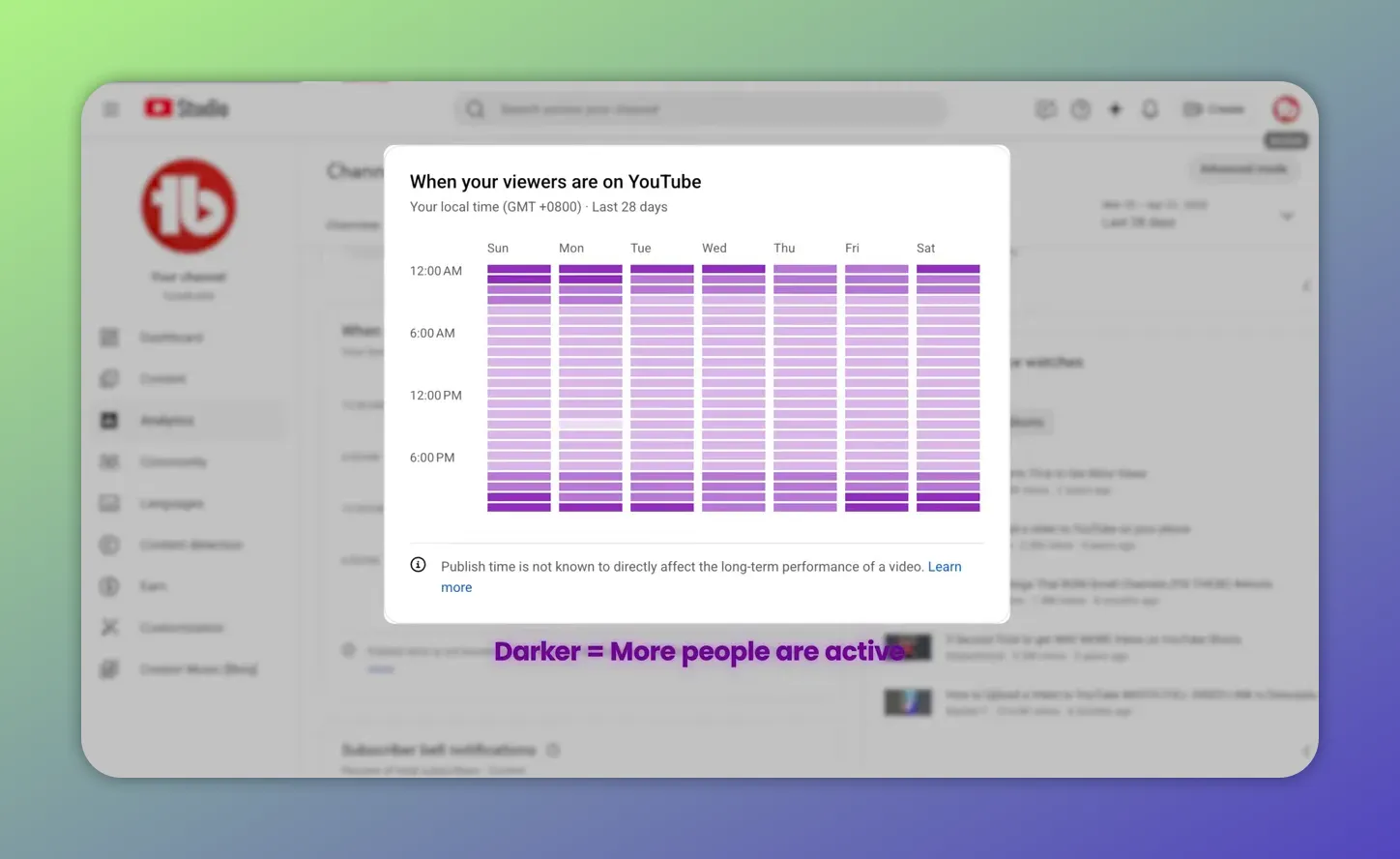
Remember how to interpret the heat map: darker sections mean more people from your audience are active during that time window.
On the surface, this seems like the perfect answer. If the darkest blocks appear on Thursday evenings or Saturday mornings, that gives you a strong clue about when your audience is around and potentially ready to engage.
How to read the heat map
The heat map is designed to show activity by day and hour. What you’re looking for is concentration:
- Are there certain days that are consistently darker than others?
- Do the darkest bands tend to happen in a specific time window?
- Is there a pattern across the week rather than one isolated spike?
If you notice repeated high-activity windows, those become your first candidates for the best time to post on YouTube for your channel.
Why this method falls short for many creators
There is one major problem: a lot of creators cannot actually use this feature yet.
YouTube does not show the heat map unless your channel has enough recent view data. If your channel is new or still small, you may just see a message saying there is not enough data available.
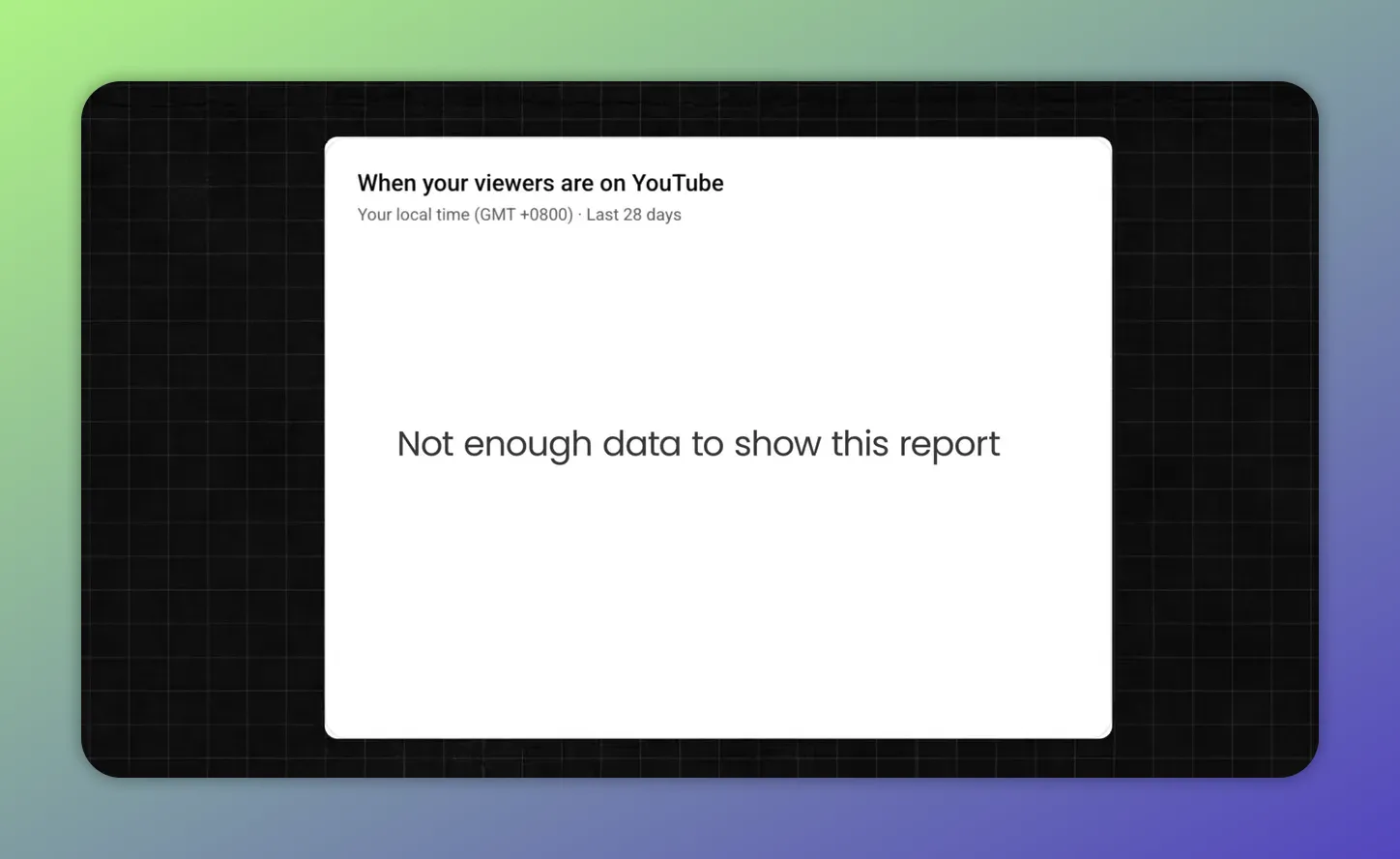
If you don’t have enough recent view data, YouTube Studio won’t show the audience heat map—so you’ll see a “Not enough data to show this report” message instead.
That makes the Studio method incomplete. It is useful when available, but not reliable as a universal solution.
And even if you do have access to the heat map, it is not always precise enough to act on confidently. It shows general activity trends, but not necessarily the exact upload window that gave top-performing videos their early traction.
So yes, Method 1 is convenient. It is just not the strongest way to find the best time to post on YouTube, especially if you need something that works at any channel size.
Method 2: Use the copycat strategy to find proven upload times
The more practical approach is what TubeBuddy calls the copycat strategy.
The idea is simple: instead of waiting until your own channel has enough data, study channels that already reach the same audience you want to reach. Their top-performing uploads can reveal timing patterns you can test on your own content.
This is not about copying content. It is about borrowing signal from proven audience behavior.
Step 1: Find two or three similar channels
Start by identifying two or three channels in your niche that make similar content to yours.
They do not need millions of subscribers. In fact, they do not even need to be huge. What matters is this:
- They serve the same type of audience you want
- Their content is similar in topic or format
- Their videos are clearly performing well
If you need help evaluating comparable channels the right way, this guide to YouTube competitor analysis is a useful companion.
Those creators have already done the hard work of building an audience in that niche. That gives you a shortcut. Instead of guessing when people in your niche are active, you can look at the upload patterns attached to content that has already gained traction.
Step 2: Sort their videos by most popular
Once you are on a competitor’s channel, sort their videos by most popular.
This is important. You do not want average uploads. You want the ones that clearly connected.
That means focusing on their best-performing videos, because those are the uploads most likely to reveal useful clues about timing.
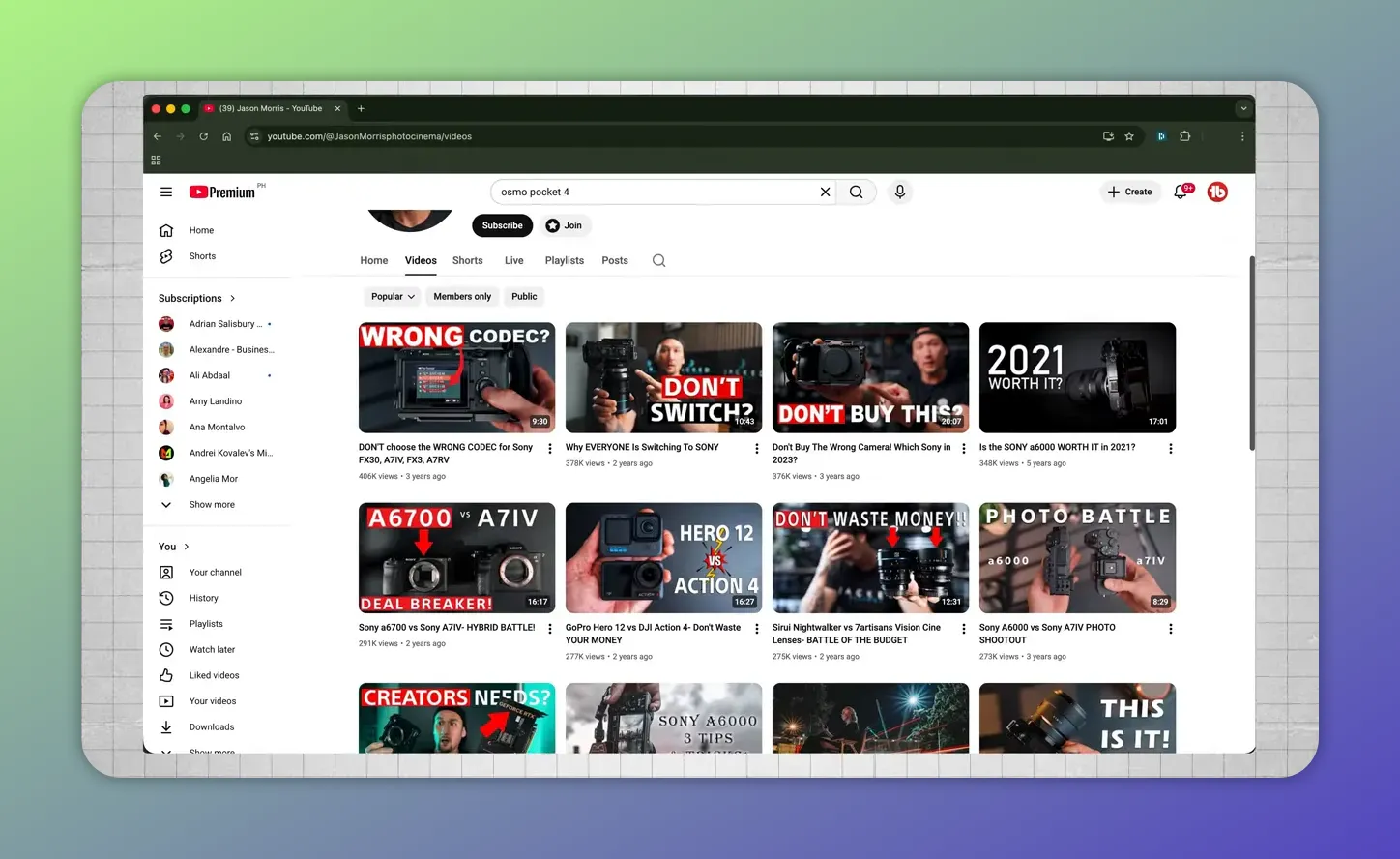
Use the competitor’s “Videos” tab and sort by “Popular” to focus on top-performing uploads—this makes the copycat strategy’s timing research meaningful.
Why most popular? Because the goal is not to document everything they post. The goal is to identify the timing patterns behind videos that broke through.
Step 3: Install the YouTube Upload Time extension
Before opening those videos, install the free Chrome extension called YouTube Upload Time.
This tool fills an important gap. On YouTube itself, upload information is often limited to a date or a relative time marker like “3 days ago” or “2 years ago.” That is not precise enough if you are trying to find the best time to post on YouTube.
The extension shows the exact upload date and time for a video, down to the minute and second.

After the extension is installed, it shows the exact upload date and time—down to the second—so you can record patterns and test your own best posting window.
That level of detail matters because patterns often appear in narrower windows than you might expect. “Thursday evening” is helpful. “Thursday around 6:00 p.m.” is actionable.
Step 4: Record the upload times of top-performing videos
Open the top-performing videos from those channels and write down the exact date and time each one was uploaded.
You can track this in a simple spreadsheet or even on paper. What matters is consistency.
A good sample size is:
- Five to ten of the channel’s best-performing videos
- Across two or three similar channels if possible
For each entry, record:
- Channel name
- Video title
- Upload day
- Upload time
You do not need to overcomplicate this. The goal is just to make the pattern visible.
Step 5: Look for patterns in day and hour
This is where the strategy becomes powerful.
Once you collect a handful of top-performing uploads, patterns usually start to emerge. You may notice that many of the big videos went live on similar days, at similar times, or within the same recurring time window.
For example, if a channel that shares your audience has several breakout videos uploaded every Thursday around 6 p.m., that is not random noise. It is a useful signal that videos in your niche have historically performed well when posted in that slot.
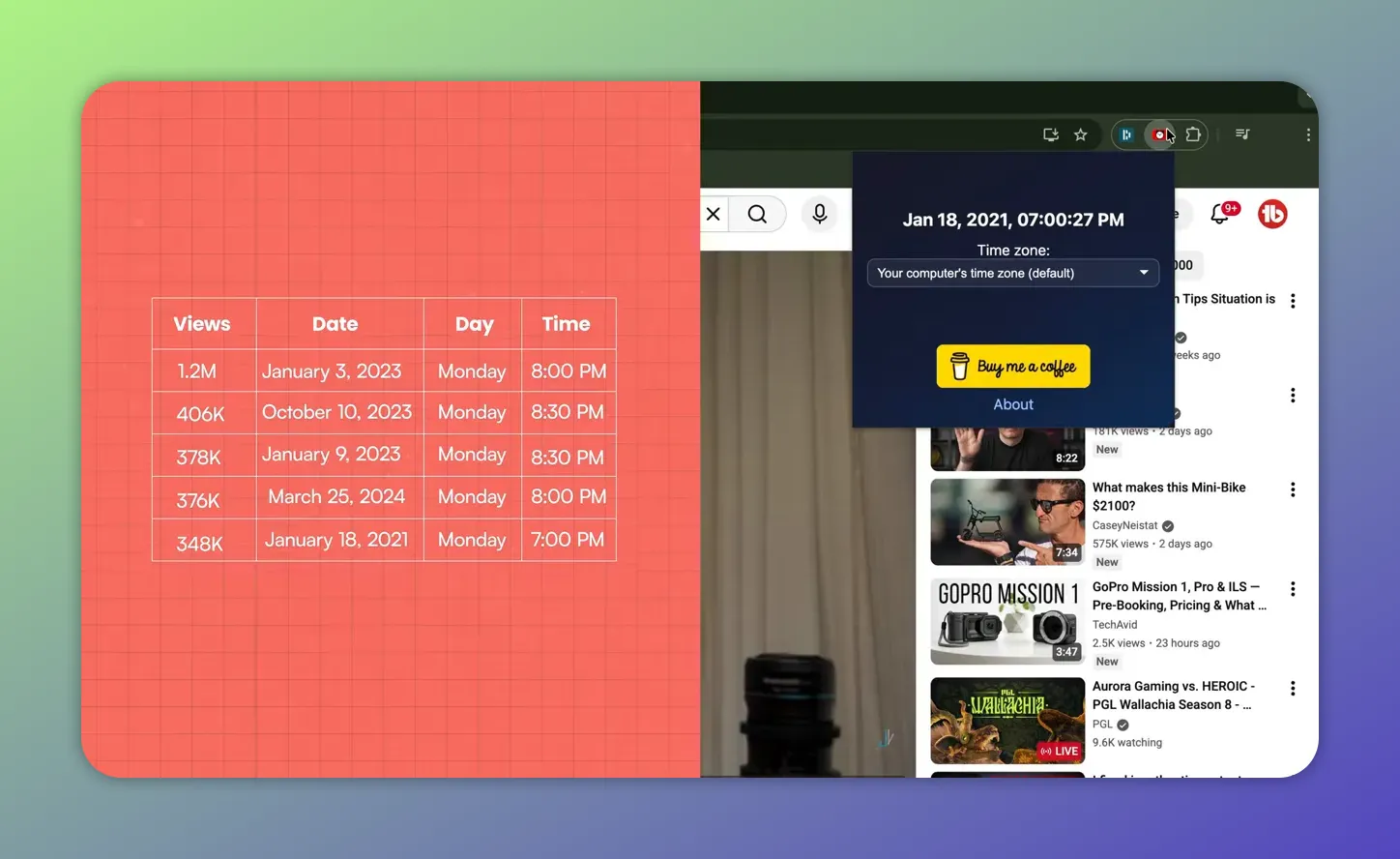
After collecting several top videos, you’ll have multiple exact timestamps—enough to see the patterns across days and hours.
This does not guarantee that Thursday at 6 p.m. is automatically the best time to post on YouTube for you. But it gives you something much better than a generic internet answer: a timing hypothesis based on real performance from content aimed at your exact type of audience.
Get an unfair advantage on YouTube
Give your YouTube channel the upper hand and easily optimize for more views, more subs, and more of every metric that matters.
Why the copycat strategy works so well
The copycat method works because it is grounded in niche relevance.
Instead of asking, “When are people on YouTube?” you are asking a much better question: “When do people who consume this type of content seem to respond best?”
That is a more useful growth question.
It is especially valuable if:
- Your channel is too small to unlock strong audience heat map data
- Your upload schedule has been inconsistent
- You want a starting point that is based on real-world performance rather than broad averages
YouTube itself regularly emphasizes understanding your audience and meeting them where they are. For broader creator guidance and platform updates, the official YouTube blog is worth keeping on your radar.
This works for Shorts and long-form
One of the best things about this method is that it is not limited to one format.
The same logic works whether you publish Shorts or long-form videos:
- Find channels that share your audience
- Study their best-performing uploads
- Check exact upload times
- Look for recurring patterns
- Test those windows on your own channel
If your strategy includes short-form content, you may also want to read this YouTube Shorts strategy guide to make sure your timing and content approach align.
The platform format changes. The audience logic does not.
How to test the best time to post on YouTube without overthinking it
Once you identify a likely upload window, the next step is simple: test it.
Do not treat one timing pattern as permanent truth. Treat it as a strong starting point.
A practical way to do that is:
- Choose one promising time window based on your research
- Use it consistently for several uploads
- Compare performance against your normal posting behavior
What you are looking for is whether publishing in that window improves early performance signals such as initial views, click activity, or momentum in the first stretch after upload.
Timing is only one part of the equation, of course. A weak title, poor thumbnail, or confusing packaging can still bury a good upload. If you want a better overall publishing system, this guide on optimizing YouTube upload settings is worth reading alongside your timing tests.
A simple workflow you can repeat in 10 minutes
If you want a lightweight system for finding the best time to post on YouTube, here is the process in its simplest form:
- Open two or three channels similar to yours
- Sort each by most popular
- Install and use the YouTube Upload Time extension
- Record five to ten exact upload times from top-performing videos
- Circle repeated days or hours
- Test that upload window on your own channel
That is it. No complicated dashboards. No guessing. No blind reliance on generic “best posting time” charts.
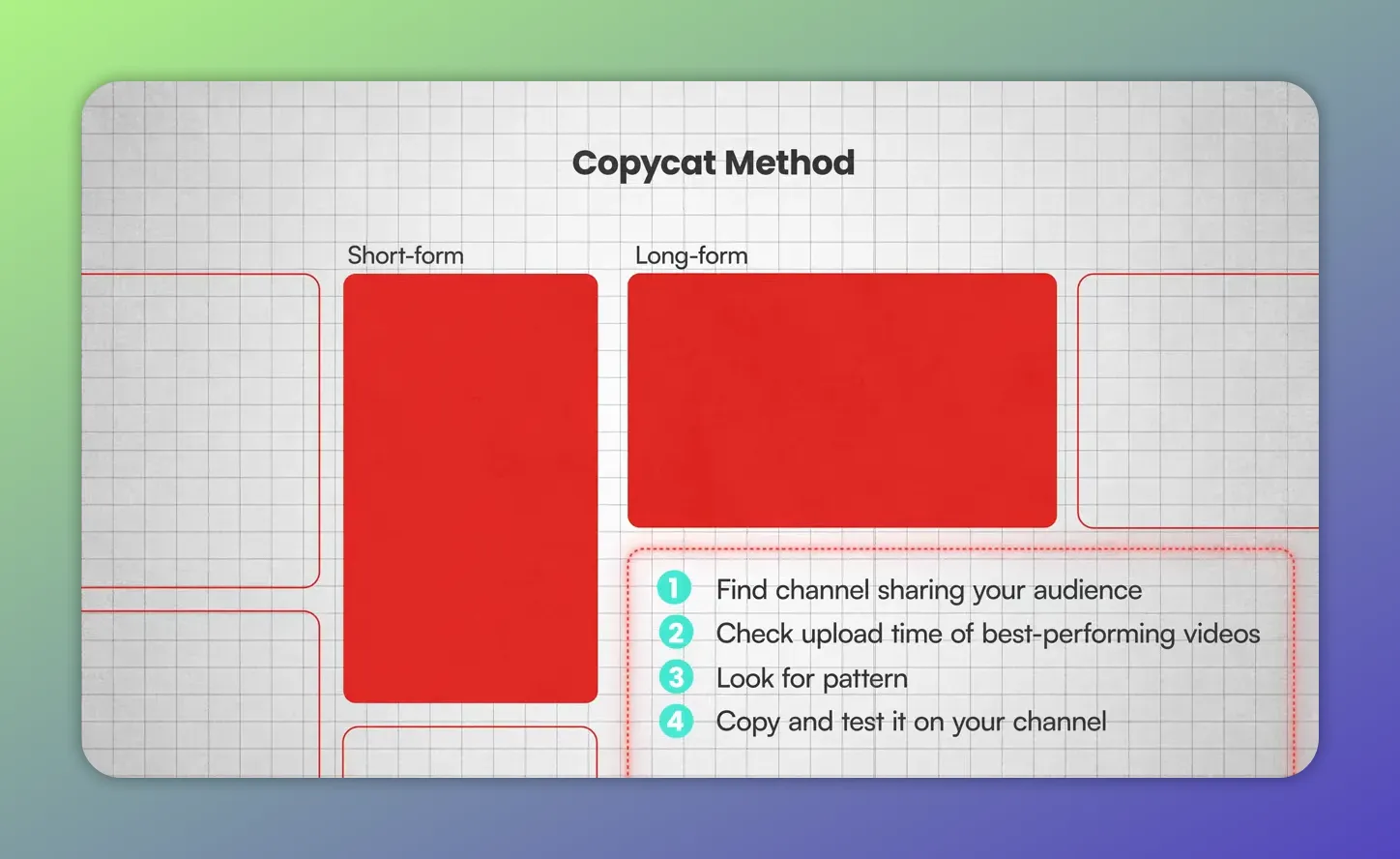
Once you see a repeated timing window, copy it as a hypothesis and test it—consistency and iteration are what turn timing guesses into a workable upload schedule.
Related reading from the TubeBuddy blog
Frequently asked questions
The best time to post on YouTube is the time when your specific audience is most likely to be active and responsive. There is no single universal answer. The most reliable way to find it is by using your YouTube Studio audience heat map if available, or by studying the upload times of top-performing videos from similar channels.
Inside YouTube Studio, go to Analytics, then Audience, and look for the heat map labeled When your viewers are on YouTube. It shows the days and hours when your audience is most active on the platform.
Many smaller or newer channels do not have enough recent view data for YouTube to display that feature. If there is not enough activity on your channel, YouTube may show a message saying there is not enough data instead of the heat map.
Yes. That is one of its biggest strengths. The copycat strategy works even if you are brand new because it relies on data from similar channels that already reach the audience you want, not on your own historical analytics.
A good starting point is five to ten top-performing videos from each similar channel you study. That is usually enough to spot patterns in days and times without turning the process into a massive research project.
Yes. The logic is the same for Shorts and long-form videos: find channels that share your audience, review the upload times of their best-performing content, identify a pattern, and test it on your own channel.
Conclusion – Stop posting blind
If you have been searching for the best time to post on YouTube, the biggest takeaway is this: stop looking for a universal answer and start looking for your answer.
YouTube Studio can help if your channel has enough recent data. But if it does not, or if you want a more practical strategy, the copycat method is a strong alternative. Study channels that reach the same audience, sort by most popular, pull exact upload times, and look for the pattern hiding in plain sight.
The creators who grow consistently are usually not the ones making the wildest guesses. They are the ones using better signals.
Find the pattern. Test the window. Refine from there. That is how you discover the real best time to post on YouTube for your channel.
Get an unfair advantage on YouTube
Give your YouTube channel the upper hand and easily optimize for more views, more subs, and more of every metric that matters.


